Just recently I was looking for a way to notify users about Inactive incidents as I have some departments that tend to ignore their work items and an e-mail about their “untouched” incidents seems to motivate them. So after some searching I found this script from Andreas Baumgarten
Please note : I only modified this script to extend its use to other Statuses to be monitored. All credit for the script goes entirely to Andreas Baumgarten
Code is below
# Configure Last Modified Days Before
$ModifiedBefore = 3

#Configure Incident Status
$IncidentStatus = 'Active'

# Configure your mail server, the recipient and the sender of the mail
# $smtphost=”mailserver.yourdomain.local”
# $from=”mail@yourdomain.local”

$smtphost=”Mailserver.demo.local”
$from=”Helpdesk@demo.local”

# Send-Mail function
function Send-Mail
{
Param($From,$To,$Subject,$Body)
$smtp = new-object system.net.mail.smtpClient($smtphost)
$mail = new-object System.Net.Mail.MailMessage
$mail.from= $From
$mail.to.add($To)
$mail.subject= $Subject
$mail.body= $Body
$mail.isbodyhtml=$true
$smtp.send($Mail)
}

# Some other variables
$BeforeDate = (Get-Date).AddDays(-$ModifiedBefore).ToString("MM/dd/yyy HH:mm:ss")
$Status = Get-SCSMEnumeration IncidentStatusEnum.$IncidentStatus$
$AssignedUserObjectRelClass = Get-SCSMRelationshipClass System.WorkItemAssignedToUser
$IncidentClass = Get-SCSMClass -name System.WorkItem.Incident$

#Get all incidents last modfied xy days before
$Incidents= @(Get-SCSMObject -Class $IncidentClass | Where {($_.Status -eq $Status -AND $_.LastModified -lt $BeforeDate)})

If ($Incidents.count -gt 0)
{

#Get all assigned incidents from list
foreach ($Incident in $Incidents)
{
# Get AssignedToUser
$AssignedUser = Get-SCSMRelatedObject -SMObject $Incident -Relationship $AssignedUserObjectRelClass

# Incidents AssignedTo is not NULL
If ($AssignedUser.Displayname -ne $NULL)
{
#Get email adress of AssignedToUser
$EndPoint = Get-SCSMRelatedObject -SMObject $assignedUser -Relationship $UserPref|?{$_.ChannelName -like '*SMTP'}
$Sendto = $Endpoint.Targetaddress

#Create Output
$Output = 'This Incident has been inactive for ' + $ModifiedBefore + ' day(s): <br>' + $Incident.ID + ' - ' + $Incident.Title + ' - Last Modified: ' + $Incident.Lastmodified
$Output
#Send email
$To = $Sendto
$Subject = 'Inactive incident for ' + $ModifiedBefore + ' day(s): ' + $Incident.Id + ' ' + $Incident.Title
$Body = $Output
Send-Mail $From $to $Subject $Body
}
}
}

Remove-Module SMlets -force
Okay, so now that the code is there, I had to make some modifications in order for the Code to work with “NON-DEFAULT” Incident Statuses. I have created some additional Pending statuses.
The key line in this code is
Configure Incident Status
$IncidentStatus = 'Active'
and
$Status = Get-SCSMEnumeration IncidentStatusEnum.$IncidentStatus$
This allows you specify the Status. However if you use additional “NON-DEFAULT” statuses, this would need to be modified to suit your needs. You would need to modify the line of code to read as follows.
$IncidentStatus = 'Enum.847741a452db4d529741005ea73aead8'
and
$Status = Get-SCSMEnumeration $IncidentStatus$
You will notice the change of $IncidentStatus to a “ENUM” Value as this is a “NON-DEFAULT” value, you need to use the ENUM value. This can be gotten by using the following with SMLets
Get-SCSMEnumeration | Format-list | out-file
Below, is a screenshot to help illustrate this further.
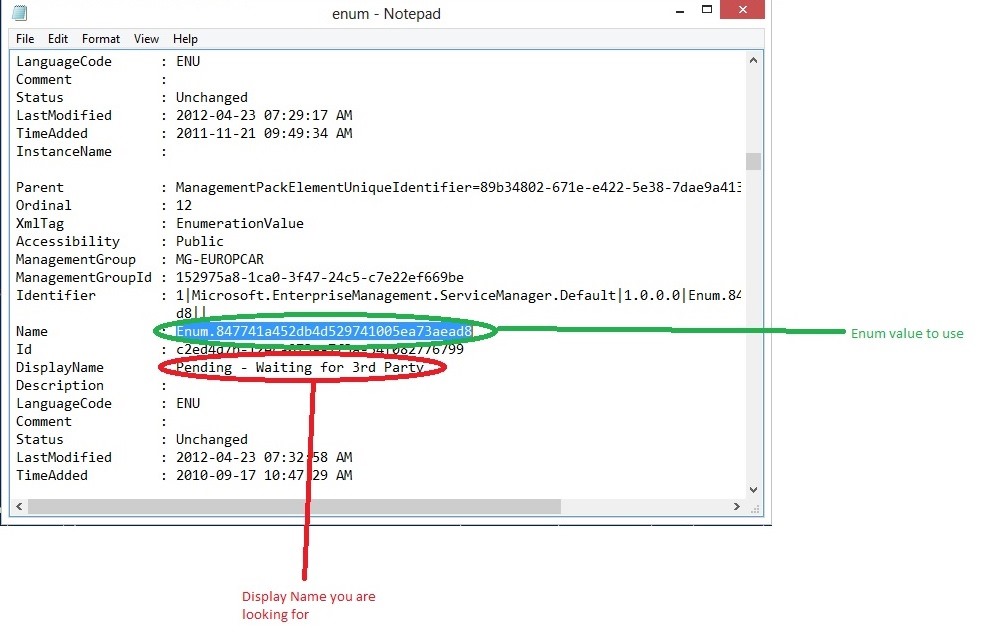
Once you have a list of all your Enumerations, then search for the required value, for example “Pending – Waiting for 3rd Party”, you will then see a “Name” value and that whole string is your ENUM value.
You will also see that the $Status line has been changed to cater for the ENUM value.
Modify to meet your needs and create a workflow if you want to.
Follow me.


 Fletcher's Cloud Blog
Leave a reply to fletcherkelly Cancel reply