So, I decided to extend the functionality of Service Manager even more with the Exchange Connector. If you follow the guide it is nice and easy to install. The configuration is quite simply as well, here is a link which gives the configuration in some detail to make you life a little.
Once the connector is installed is when I found a little “gotcha” if you will. With the connector, it updates any incident with the same template, which can cause issues and potentially change your Priority and Urgency which can lead to some skewed reporting. So I asked this question on the forums and Andreas came up with a clever solution. The use of an “empty template”. I have since implemented this and it works well. The “Empty Template” does not modify any of your Tiers, Classifications or Impact or Urgency or any such settings. By doing this it allows me to use only the core functionality as I want to.
I was primarily interested in “First Response”, “Resolution”, “Updating” and closure of incidents and service requests. This solutions works VERY well for me and I would highly recommend this solution.
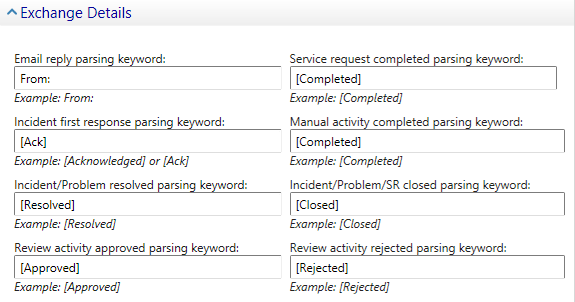
One last gotcha, if you want to modify the details on the connector from a console not on the server, remember to copy the dll’s used in the installation to the machine hosting the console.
Hope this helps,
Follow me.


 Fletcher's Cloud Blog
Leave a comment