So, You are now ready to take the plunge and upgrade to SCSM 2012 RTM as it now “publically” available.
There is great documentation, obviously, on TECHNET. I have however found out a few other things which will helpfully make your transition a little easier. I have found that the following can cause some complications and how to “mitigate” these if you will.
Service Manager 2010
Connectors – Please make sure that your connectors are NOT running while you do the upgrade, the upgrade will work, however your connectors will run and attempt to catch up with itself. This will in turn, create additional load on the SQL Service on your Management Server, which will in turn affect overall performance and will slow down workflows in particular.
Fix : Simply ensure that your connectors are NOT running.
Service Manager 2012 PRE-RTM
Connectors – Please make sure that your connectors are NOT running while you do the upgrade, the upgrade will work, however your connectors will run and attempt to catch up with itself. This will in turn, create additional load on the SQL Service on your Management Server, which will in turn affect overall performance and will slow down workflows in particular.
Fix : Simply ensure that your connectors are NOT running.
Cubes – If you are upgrading from a PRE-RTM Version to RTM, please note that I am sure that is not supported by Microsoft unless you were a TAP customer. So, this would be more for a lab environment. If your cubes are running, please allow them to process and ensure that they are in a processed and preferably NOT a “Partial Processed” state. Please also check the status of these job as per the TECHNET article and ensure that get-scdwjob returns all jobs in a “Not Started” state.
Fix : Ensure all cubes are in a processed state and NOT “Running” or “Partial Processed”
As for System Centre Service Manager 2012, the connectors are greatly improved in SCSM 2012, while your SCSM 2010 Connectors will work, you will see that there is a difference in the Connectors as seen below.
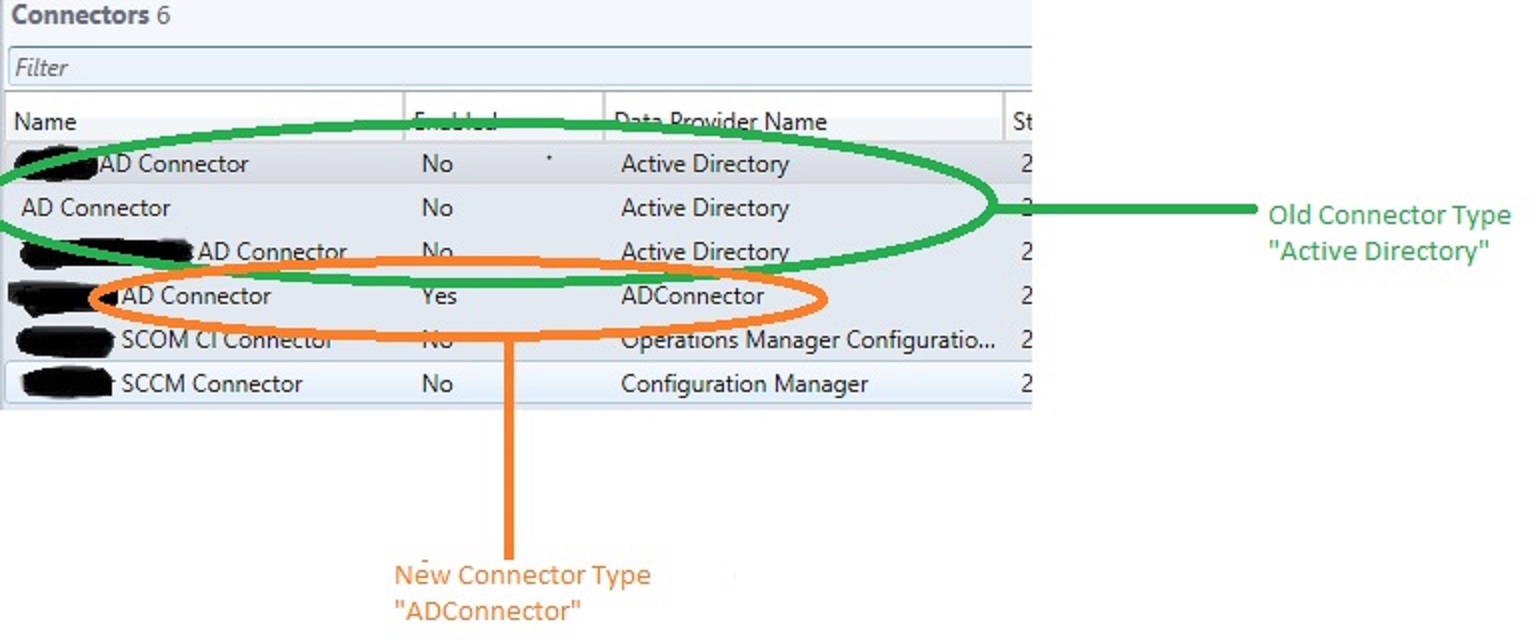
The old connectors “Active Directory” are migrated from SCSM 2010 to SCSM 2012. However, the new type “ADConnector” are more robust and more streamlined. I would recommend Creating the new type for all your existing connectors, disabling the existing and running only the new connectors. Once you are happy with the results and that new objects are being created and tested this for some time, then remove the older connectors.
If I can think of anything more, I will post this in future.
Follow me


![MCC11_Logo_Horizontal_2-color_thumb_[1]](https://blog.fskelly.com/wp-content/uploads/2012/04/mcc11_logo_horizontal_2-color_thumb_1.jpg "MCC11_Logo_Horizontal_2-color_thumb_[1]")
 Fletcher's Cloud Blog
Leave a comment